Product Description
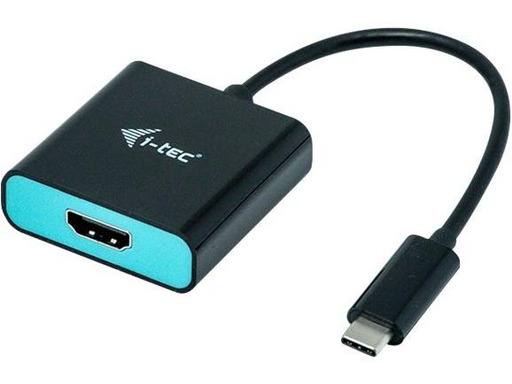
Expand your computer's workspace with an external display via HDMI or connect a projector or television with the HDMI interface to your laptop, tablet, or desktop computer (PC) through the new USB-C or Thunderbolt 3 connector. The adapter supports video transmission with a resolution of 4K Ultra HD up to 3840 x 2160 pixels including audio signal.
Usage is very simple. Just plug the adapter into the USB-C or Thunderbolt 3 port of your computer and then, using an HDMI cable, connect it to the display device, and immediately after, you can work without worry with the entire setup. The installation of computer drivers occurs automatically from the system.
Make sure to check the compatibility of your device to ensure it meets all necessary requirements for operation with specific i-tec products, particularly the video output (Display Port Alt mode). If your device is not fully compatible, your new i-tec product may not function correctly. You can find specifications regarding your device (USB port, for example) in the manual provided with your laptop/tablet/smartphone or alternatively, through the customer service of your device's manufacturer.
Product Features
- i-tec USB-C HDMI Adapter 4K/60 Hz.
- Cable length: 0.15 m, Connector 1: USB Type-C, Connector 2: HDMI.
- Weight: 27 g, Width: 54 mm, Depth: 54 mm.
- Package width: 160 mm, Package depth: 120 mm, Package height: 25 mm
Technical specifications
Général
Type de périphérique
Adaptateur vidéo externe
Résolution maximale
3840 x 2160 à 60 Hz
Détails d'interface
HDMI (connecteur femelle) ¦ USB-C (connecteur mâle)
Fonctions
Alimenté par USB, DisplayPort Alternate Mode, compatible avec Thunderbolt 3
Configuration requise
Exigences supplémentaires
Doit être compatible avec le DisplayPort via USB-C ou DP Alt Mode
Divers
Garantie du fabricant
Service et maintenance
Garantie limitée - 2 ans ¦ Support technique - durée de vie