Product Description
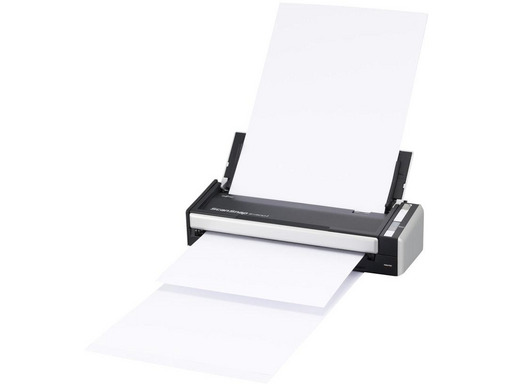
Performance in a compact format!With a footprint of nearly half a sheet of paper, the ScanSnap S1300i is designed for convenience and ease of use, a one-button method allows you to scan double-sided multipage documents whether at the office or on the go. Stack up to 10 pages in the Automatic Document Feeder (ADF) and press the blue button.
Double-sided multipage scanningThe ScanSnap S1300i scans both sides of each page at speeds of up to 12 pages per minute directly to PDF, searchable PDF, JPEG, or to office applications like Word or Excel®. The ScanSnap S1300i automatically recognizes the size of each document, detects and corrects skew, and displays images in the correct orientation. You can even choose to automatically delete blank pages.
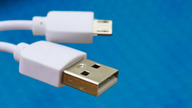
Powered by USB Bus for greater portabilityThe ScanSnap S1300i comes with an AC adapter but for greater convenience while traveling, the ScanSnap S1300i can be powered via the USB ports of the computer* when a power source is not available.
* When using the Bus power cable, the computer must have two USB ports, one for power and the other for connecting the USB cable.
A scanner compatible with PC or MacThe Quick Menu allows you to quickly switch between different scanning modes. Just press the scan button and choose what you want the ScanSnap to do:
- Scan to folder: Store scanned documents in a local folder, a network folder, or on SharePoint (PC)
- Scan to email: Forget the fax and share electronic documents via email
- Scan business cards: Scan business cards and automatically extract contact information
- Scan to printer: Use ScanSnap with your printer to make copies
- Scan to Word (.doc): Scan directly to an editable Word file
- Scan to Excel (.xls): Scan directly to an editable Excel file
- Scan to PowerPoint (.ppt): Scan directly to an editable PowerPoint file (Windows only)
- Scan to Microsoft SharePoint, Scan to Salesforce Chatter
- Scan to iPhone®/iPad® or AndroidTM devices
- Scan to Cloud: Scan to Dropbox, Evernote®, Google® DocsTM* and/or SugarSync
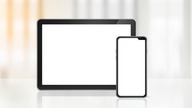
Scan to mobileThe S1300i allows you to scan via Wi-Fi to iPad®, iPhone® and Android devices for convenient viewing with the ScanSnap Connect Application*.
The app supports many devices running Android 2.2 or later. For a list of supported smartphones and tablets on Android, visit:
*The ScanSnap Connect Application is available for free download from the official application distribution service of the terminal (i.e., Google Play and Apple App Store). To use this feature, Wi-Fi must be enabled on the computer where ScanSnap is installed.
Multiple cloud scanning optionsLike all existing ScanSnap models, the S1300i can connect to cloud services Dropbox, Evernote, Google Docs™, Salesforce CRM, and SharePoint Online (for Windows®). It also provides some additional cloud synchronization functions: Scan to SugarSync and scan to Salesforce Chatter as well as the ScanSnap folder for Windows OS only where you can scan to your favorite cloud service when no scanning interface is available with import capability.
Apple, iPad, iPhone, iPod Touch, and iTunes are trademarks of Apple Inc. licensed in the U.S. and other countries. The App Store is a service mark of Apple Inc.
ScanSnap Receipt*
The ScanSnap Receipt software allows you to easily scan your receipts and extract essential information, even exporting the content for tax declarations.
*Available via online update only.
ScanSnap Sync*
With the integration of ScanSnap Sync in the ScanSnap Organizer software and the ScanSnap Connect application, your scanned documents are automatically synchronized across all your devices via Dropbox, Google Drive, or Microsoft OneDrive.
*Available via online update only.
Product Features
- Fujitsu ScanSnap S1300i.
- Maximum scanning area: 216 x 863 mm, Optical scanning resolution: 600 x 600 DPI, ADF scanning speed (color, A4): 12 ppm.
- Scanner type: ADF Scanner, Product color: Black, Silver.
- Sensor type: Dual CIS, Light source: LED RGB, Scan to: File, Image.
- Automatic Document Feeder capacity: 10 sheets.
- Maximum ISO A series paper size: A4, Supported media scanning types: Business card, Envelopes, Photo paper, Plain paper, ISO, A Series format (A0...A9): A4, A5, A6, A8
Technical specifications
Général
Type
Scanner de documents - portable
Taille maximale de document pris en charge
216 x 863 mm
Scanner
Résolution optique
600 dpi x 600 dpi
Impression recto-verso automatique
Oui
Type de capteur de numérisation
Capteur d'images de contact (CIS)
Vitesse maximale de numérisation de documents - noir et blanc
12 ppm
Vitesse maximale de numérisation de documents - couleur
12 ppm
Détails sur la vitesse de numérisation
12 ppm - portrait (alimentation secteur) (recto) / noir et blanc (verso) - A4 - 300 ppp ¦ 24 ipm - recto-verso - portrait (alimentation secteur) (recto) / noir et blanc (verso) - A4 - 300 ppp ¦ 4 ppm - portrait (alimentation bus USB) (recto) / noir et blanc (verso) - A4 - 200 ppp ¦ 8 ipm - recto-verso - portrait (alimentation bus USB) (recto) / noir et blanc (verso) - A4 - 200 ppp ¦ 9 ppm - portrait (alimentation secteur) (recto) / couleur (verso) - A4 - 200 ppp ¦ 18 ipm - recto-verso - portrait (alimentation secteur) (recto) / couleur (verso) - A4 - 200 ppp ¦ 3 ppm - portrait (alimentation bus USB) (recto) / couleur (verso) - A4 - 200 ppp ¦ 6 ipm - recto-verso - portrait (alimentation bus USB) (recto) / couleur (verso) - A4 - 200 ppp
Fonctions du scanner
Alimenté par port USB
Gestion du support
Taille maximale de document
216 mm x 863 mm
Type de chargeur de document
Automatique
Capacité de stockage de documents
10 feuilles
Extension/connectivité
Interfaces
USB 2.0 - Type B
Alimentation
Périphérique d'alimentation
Adaptateur secteur externe
Tension requise
CA 120/230 V (50/60 Hz)
Consommation en fonctionnement (en veille)
9 Watt (3.2 Watt)
Logiciels / Configuration requise
Logiciel(s) inclus
ScanSnap Manager, CardMinder, Scan to Microsoft SharePoint, ABBYY FineReader for ScanSnap, ScanSnap Organizer, ScanSnap Receipt, Evernote, ScanSnap Sync
Système d'exploitation requis
Microsoft Windows Vista (32/64 bits), Microsoft Windows 7 (32/64 bits), Microsoft Windows XP (32/64 bits), Apple MacOS X Lion 10.7, Apple OS X 10.8 Mountain Lion, Windows 8 (32/64 bits), Windows 8.1 (32 /64 bits), Apple OS X 10.9 Mavericks, Apple MacOS X 10.10, Windows 10 (32/64 bits), Apple MacOS X 10.11, Apple macOS 10.12
Dimensions et poids
Garantie du fabricant
Service et maintenance
Garantie limitée - 1 an
Caractéristiques d’environnement
Température minimale de fonctionnement
5 °C
Température maximale de fonctionnement
35 °C
Taux d'humidité en fonctionnement
20 - 80%