Product Description
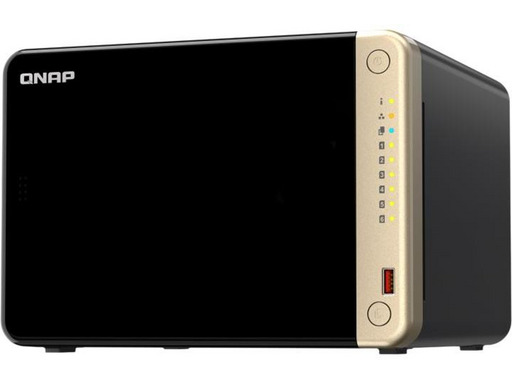
TS-664The Intel quad-core NAS with dual 2.5GbE ports supports M.2 SSD caching and PCIe expandability for high-speed transmission and virtualization applications.
Powered by a quad-core Intel® Celeron® N5105/N5095 processor (capable of boosting up to 2.9 GHz), the TS-664 features two 2.5GbE RJ45 ports and Port Trunking for a combined bandwidth of up to 5 Gbit/s. With M.2 PCIe Gen3 slots and PCIe Gen 3, the TS-664 offers flexibility in extending NAS functionalities, allowing you to install a QM2 card for M.2 SSD caching or an Edge TPU for AI image recognition, as well as various 10/5GbE network cards. The TS-664 comes with 4 GB of RAM to run lightweight VMs and containers. Additionally, it supports multi-cloud backup, cloud storage gateways, 4K HDMI output, and real-time transcoding, along with expandable storage capacity and feature-rich apps to operate as a cost-effective and reliable 2.5GbE NAS.
High-performance quad-core with up to 16 GB of RAMThe TS-664 is powered by an Intel Celeron N5105/N5095 quad-core processor and supports up to 16 GB of DDR4 memory, two 2.5GbE ports, and SATA 6 Gbit/s drives. The built-in Intel® AES-NI encryption engine also helps protect sensitive data without affecting system performance.
Accelerate AI-based image recognition and caching with TPU and PCIe expansionThe TS-664 has two M.2 PCIe Gen3 slots, allowing for SSD caching or SSD storage pools to enhance performance, or the Edge TPU for AI image recognition.
Install M.2 NVMe SSDs for cache acceleration or efficient tiered storageThe TS-664 supports SSD caching and includes two M.2 slots that support NVMe1 M.2 PCIe SSDs with 2280 form factors (sold separately) to boost overall NAS performance. The Qtier™ technology can also be used to enhance the TS-664 with automatic tiering that helps continuously optimize storage efficiency across all installed storage devices.
AI-based image recognition with TPUBy leveraging a Google Edge TPU on QNAP AI Core (the AI-based engine for image recognition), the TS-664 can perform rapid face and object recognition. Google Edge TPU allows QuMagie to quickly process thousands of photos through high-speed AI image recognition and classification, and QVR Face to analyze videos in real-time for instant facial recognition.
SSD caching and automatic tiering enable 24/7 storage efficiency optimizationThe capacity and performance of SSDs continue to increase, allowing organizations to easily leverage the strengths of SSDs. The TS-664 supports numerous SSD-compatible features that significantly enhance NAS performance with high cost-effectiveness.
Simplify large file transfers and video editing with 2.5GbEThe TS-664 comes with two 2.5GbE RJ45 network ports (2.5G/1G/100M) that allow you to use existing CAT5e cables to upgrade network speeds from 1 to 2.5 Gigabit. Similarly, both 2.5GbE ports support port aggregation for transfer speeds of up to 5 Gbit/s, improving the efficiency of bandwidth-intensive business applications such as large file transfers, fast backup/restoration, and multimedia transfer and editing.
Future-proof your IT infrastructure for high-speed networksThe TS-664 perfectly fits QNAP's manageable and unmanaged 2.5GbE/10GbE switches to form scalable, secure, and high-speed network environments without exceeding budget. QNAP also provides 2.5GbE/5GbE/10GbE PCIe cards and 5GbE USB adapters for Windows®/Linux® workstations, allowing you to easily establish a high-speed network environment for productive team collaboration.
Enhance your productivity with multiple USB portsWith two USB 3.2 Gen 2 (10 Gbit/s) ports and two USB 2.0 (480 Mbit/s) ports, you can quickly back up and transfer large files to/from the TS-664. ASI and other compatible USB devices can also be connected to enhance functionality and application potential.
High I/O capabilities with PCIe expansionThe TS-664 has a PCIe Gen 3 x2 slot for installing expansion cards to increase application potential.
Direct 4K HDMI output for displaying multimedia content and virtual machinesThe TS-664 features Intel® UHD Graphics that supports dual-channel hardware decoding and real-time transcoding*. The HDMI 2.0 output supports up to 4K. This provides exceptional benefits for applications such as video production/editing or industrial design that require high resolution and color realism, as well as massive multimedia storage, transfer, and display capabilities. By connecting the TS-664 to an HDMI display, you can directly watch multimedia content recorded on the NAS or use the TS-664 as a versatile workstation by directly outputting virtual machines from Virtualization Station or Linux Station.
Faster image identification with the built-in Intel® OpenVINO™ AI engine.With integrated Intel® OpenVINO™ AI computing resources, the TS-664 accelerates AI image recognition performance without affecting other applications or services. QNAP AI Core primarily works with the QuMagie application.
QTS 5, fast, smooth, and user-friendly!The TS-664 comes with the QTS 5 operating system by default, offering a next-generation user experience with an updated system kernel, optimized user interface, and advanced security features.
Sharper. Smoother. You’ll love it.When navigating through QTS 5, you will notice a more detailed care for a superior browsing experience. Enjoy a smoother NAS experience, a visually pleasing design, and find your favorite apps faster.
Get started with the dashboardDuring the initial setup, the dashboard guides you through the configuration process. Just follow the step-by-step instructions for a quick and easy setup.
Smooth and responsive user interfaceWhether you are clicking buttons, switching apps, or resizing windows — every action is much smoother. The search bar in the main menu also helps quickly locate desired apps.
Comprehensive backup and disaster recovery solutionThe TS-664 supports various apps that cover all your backup needs. Adopt safe computing habits by regularly backing up your files and device content, making it easy to restore them if necessary.
PC/laptop backupFor Windows®, install NetBak Replicator to back up your PC to your QNAP NAS. In macOS®, simply set up the built-in Time Machine® to secure your data.
Remote backup for NASHybrid Backup Sync makes it easy to back up data from a TS-664 to another QNAP NAS or remote server to meet your 3-2-1 backup strategy.
VM backupEnjoy free VMware® and Hyper-V VM backup with source-side incremental backup, global deduplication, and restoration compression.
SaaS backupProtect enterprise cloud data by backing up/synchronizing files, emails, calendars, and contacts from Google™ Workspace and Microsoft® Office 365® to the NAS.
Cloud backup for NASHybrid Backup Sync supports major cloud storages to back up NAS data. To back up to object cloud storage, VJBOD Cloud is particularly useful for reducing bandwidth usage and backup time.
QuDedup technologyHybrid Backup Sync eliminates redundant data at the source and then backs up deduplicated data, saving time and storage costs while providing efficient multiversion backups.
Multiversion snapshots reduce ransomware threatsThe TS-664 supports block-based snapshots that record the system state at any time. It helps protect data, which can be restored to a point in time, significantly reducing the threat of ransomware.
LUN and volume snapshotsTake snapshots in seconds and restore the entire volume/LUN to a specific point in time to prevent the loss of important data.
Instantly restore snapshotsThe snapshot content can be quickly restored to a local NAS or restored based on a folder/file on a local or remote NAS, or to cloud storage. You can also easily view and restore snapshots from the client side.
Backup snapshotsMultiply data protection by backing up snapshot files! Replicate volume/LUN snapshots from the TS-664 to a remote NAS (Snapshot Replica) by copying only the changes made. This can save you time and bandwidth and can be executed manually or scheduled.
All-in-one solution for hosting virtual machines and containersBy running multiple virtual machines and containers on the TS-664, you can deploy multi-tenant environments and applications to increase management efficiency and save hardware costs. Coupled with the Network & Virtual Switch app that boosts interoperability between virtual machines, containers, the QNAP NAS, and other physical devices on the network, you can flexibly allocate physical and virtual network resources to simplify network deployment.
Virtualization StationRun multiple Windows®, Linux®, UNIX®, Android™ virtual machines as well as QuTScloud and access them via a web browser or Virtual Network Computing (VNC). Businesses can run virtualized server applications on a single NAS without additional physical servers.
Container StationTake advantage of lightweight container virtualization technologies such as Docker®, LXD, and Kata, download apps from the Docker Hub Registry®, import/export containers, and create abundant microservices.
Linux StationRun Linux® applications (including apps from the Software Center) directly on the NAS and remotely access the Linux® desktop from a web browser. The open-source Linux® platform is also ideal for Internet of Things development.
Comprehensive security and privilege settingsThe TS-664 contains flexible privilege settings and security measures. In addition to IP blocking, two-step verification, and HTTPS connection, there are other apps that help ensure optimal NAS protection against threats such as malware and hackers.
myQNAPcloud secures remote accessmyQNAPcloud allows easy connection to the TS-664 via the Internet without complex DDNS settings. To ensure the security of your remote access service, myQNAPcloud strengthens keys on SSL Certificates to 2048 bits.
Simplified privilege settingsThe TS-664 supports comprehensive access rights settings for shared folders, Azure Active Directory Domain Services (Azure AD DS), LDAP, and Windows ACL to help IT staff efficiently manage user accounts and access rights across multiple NAS systems.
Protection with QuFirewallSupports IPv6, firewall access lists, and GeoIP filtering to restrict access based on geographical locations to enhance NAS network security.
Superior security with QVPNA virtual private network (VPN) secures access to resources and network services over public networks. QVPN supports creating a VPN client, using the TS-664 as a VPN server, and the WireGuard® VPN service with a user-friendly interface to configure a secure connection.
SD-WAN QuWANTo facilitate digital transformation, multi-site extension, and remote work, the SD-WAN QuWAN helps automatically mesh multi-site VPNs. It includes IPsec encryption and cloud-based management, securing the multi-site network, including the QNAP NAS and VMware ESXi platforms.
Security CounselorA security portal for the TS-664 to identify vulnerabilities and provide recommendations to enhance NAS security. It also integrates antivirus and anti-malware analysis software.
Malware RemoverRegularly scan your TS-664 using the latest malware definitions. If infected files are detected, they will be immediately removed to ensure the security of NAS data.
The best file storage and collaboration centerThe TS-664 integrates rich applications for storing, managing, synchronizing, searching, and archiving files. It supports SMB/CIFS, AFP, and NFS protocols to simplify file sharing on Windows®, Mac®, and Linux®/UNIX®. Additionally, it offers the smartest NAS solution for professionally managing your files.
Intelligent surveillance solution for 24/7 securityQVR Elite is QNAP's subscription-based intelligent surveillance solution that allows you to easily deploy a surveillance system with a lower total cost of ownership and superior scalability. Recordings are saved as MP4 files, allowing them to be played on almost any device. Furthermore, QVR Elite integrates QNAP's AI solutions to establish intelligent facial recognition for retail and door access systems with the QNAP NAS. You can organize a dedicated and independent storage space for surveillance data on the TS-664 and enjoy camera management, storage space allocation, live camera viewing, and simplified playback.
Flexible and cost-effective storage expansionQNAP offers simple ways to increase your storage capacity. Here are several ways to expand storage on your TS-664 as needed, to accommodate data and business growth.
Connect QNAP expansion enclosuresConnect expansion enclosures to the TS-664, then manage NAS storage expansion with the user-friendly Storage Manager and snapshots app.
Mount cloud storage or remote file serversMount cloud storage or remote file servers to increase the TS-664's capacity while also centralizing file management across the NAS, cloud storage, and remote devices.
Migrate to a new NASInstall your NAS hard drives on a larger QNAP NAS and retain all your existing data and configurations.
Upgrade RAID capacityHot-swap smaller capacity drives with larger capacity drives to increase your NAS capacity so it can grow alongside your business.
Product Specifications
- QNAP TS-664.
- Type: NAS.
- Chassis Type: Tower.
- Device Class: SMB.
- Processor Family: Intel® Celeron®, Processor Model: N5095, Processor Frequency: 2 GHz.
- Internal Memory: 8 GB, Internal Memory Type: DDR4.
- Total Installed Storage Capacity: 0 TB.
- Installed Operating System: QNAP QTS
Technical specifications
Général
Type de périphérique
Serveur NAS
Connectivité hôte
2.5 Gigabit Ethernet
Capacité de stockage totale
0 Go
Périphériques installés / Nbre de modules
0 (installé) / 6 (maximum)
Appareils intégrés
Capteur IR
Processeur / mémoire
Processeurs installés
1 x Intel Celeron N5095
Nombre de coeurs
Quadricœur
Nombre max. pris en charge
1
Vitesse maximale en mode Turbo
2.9 GHz
Mémoire flash installée
4 Go
Contrôleur de stockage
Type d'interface
SATA 6Gb/s
Niveau RAID
RAID 0, RAID 1, RAID 5, RAID 6, RAID 10, RAID 50, JBOD
Réseaux
Protocole de liaison de données
10Mb LAN, 100Mb LAN, 1GbE, 2.5GbE
Protocole réseau / transport
CIFS, iSCSI, QuFTP, IPv6, IPv4, DDNS, PPTP, L2TP, IPSec, WireGuard, QBelt, OpenVPN
Protocole de gestion à distance
TFTP, SNMP 2, SNMP 3, SSH, Telnet, HTTP, HTTPS, RADIUS
Compatibilté des services réseau
Protocole AFP, système de fichiers Internet standard Microsoft, FTP, Network File System v3 (NFS v3), Network File System v4 (NFS v4), SFTP, HTTP, HTTPS
Performances
Connexions simultanées (CIFS): 1500 - (avec mémoire maximale) ¦ Nombre maximal de groupe d'unités de stockage: 128 ¦ Nombre maximal de volumes: 128 ¦ Taille maximale du volume: 250 TB ¦ Taille maximale de parc: 308 TB ¦ Taille maximale du dossier partagé: 250 TB ¦ Nombre maximum de dossiers partagés: 512 ¦ Intervalle minimum d'instantanés: 5 min ¦ Connexion FTP maximale: 1024 ¦ Compte utilisateur local: 4096 ¦ Compte de groupe local: 512 ¦ Compte utilisateur/groupe du domaine: 200000 ¦ Enregistrement du journal: 3000 événements par seconde ¦ Hôtes virtuels: 32 ¦ Taille maximale de LUN: 250 TB ¦ Nombre maximum de cibles LUN: 256
Caractéristiques
Unité de virgule flottante, matériel de transcodage intégré, Prise en charge de l'accélération de la mémoire cache SSD, WOL, support d'images étendues, Groupe d'unités de stockage, Groupe d'unités de stockage SED, Extension JBOD, VJBOD Cloud, service de fibre optique, file-based iSCSI LUN, block-based iSCSI LUN, masquage LUN, mappage LUN, WWPN Aliases Import/Export, FC Port Group, FC Port Binding, MPIO, extension de capacité LUN en ligne, LUN snapshot, réplication et clonage d'instantanés LUN, hiérarchisation automatique des tâches, RAID Group, RAID Level Migration, RAID Expansion, Storage Pool Expansion, RAID Hot Spare, RAID Sync/Rebuild/Scrubbing, Disque, localisation de boîtier, Scan S.M.A.R.T. du disque, Migration des données S.M.A.R.T. du disque, garniture de SSD, SSD life estimation, Itinérance de disque, Disque en attente, Instantané du volume, Politique de conservation des instantanés, Récupération d'instantanés en accès libre, Application composée d'instantanés, Snapshot Full Clone, Snapshot Replica / Vault, SSD read-only Cache, SSD read-write cache, SSD write-only cache, outil de profilage de SSD, Gestion des dispositifs externes, SSD Cache RAID, MTP, Serveur FTP, support FXP, Object Storage, station de fichier, domain security, contrôleur de domaine, autorisation de dossier partagé, autorisation avancée des dossiers, Windows ACL, gestion de quota d'utilisateur, quota de groupe, quota de dossier, dossier personnel, Resource Monitor, Network Recycle Bin, Virtual Switch, agrégation de ports, prise en charge du réseau local (LAN) virtuel, serveur DHCP, security counselor, malware remover, 2-step verification, Allow/Deny List, Access Protection, Reliure de service, support de serveur WebDAV, Qsync, HybridMount, Windows ODX, synchronisation de sauvegarde hybride, Hyper Data Protector, Boxafe, Qsirch, QuMagie, LDAP server, HD Station, SQL Server, Qfiling, QmailAgent, QuWAN, DA Driver Analyzer, Q'center (NAS CMS)
Algorithme de chiffrement
AES-NI, SSL, TLS, AES 256 bits, FIPS 140-2, TLS 1.0, TLS 1.1, TLS 1.2, TLS 1.3
Extension/connectivité
Baies d'extension
6 (total) / 6 (libre) x échangeable à chaud - 2.5" / 3.5"
Logements d'extension
2 (total) / 2 (libre) x M.2 2280 ¦ 1 (total) / 1 (libre) x PCI Express 3.0 x2
Interfaces
2 x 2.5 Gigabit Ethernet - RJ-45 ¦ 2 x USB 2.0 - Type A ¦ 2 x USB 3.2 Gen 2 - Type A ¦ 1 x sortie HDMI
Divers
Câbles inclus
1 x câble réseau
Caractéristiques
2 x ventilateurs de refroidissement de 90 mm, fente de verrouillage de sécurité (câble de verrouillage vendu séparément), Secure Erase, Smart Fan, pare-feu intégré
Type de logement de sécurité
Serrure de sécurité Kensington
Normes de conformité
FIPS 140-2
Accessoires inclus
Câble d'alimentation, 18 x vis à tête plate (pour disque dur de 2,5"), 18 x vis à tête plate (pour disque dur de 3,5")
Alimentation
Périphérique d'alimentation
Adaptateur électrique externe
Tension requise
CA 100-240 V
Consommation en fonctionnement
44.02 Watt (avec les disques complètement installés)
Consommation électrique en veille
23.22 Watt
Alimentation fournie
120 Watt
Logiciels / Configuration requise
Système d'exploitation du stockage
QNAP QTS 5.0.1
Système d'exploitation requis
Apple MacOS X 10.10 ou plus récent, Ubuntu Linux 14.4 (64-bit), CentOS 7.0, Red Hat Enterprise Linux 6.6, SuSE Linux 12 ou plus récent, IBM AIX 7, Microsoft Windows 7 / 8 / 10 / 11, Microsoft Windows Server 2008 R2, Microsoft Windows Server 2012, Microsoft Windows Server 2012 R2, Microsoft Windows Server 2016, Microsoft Windows Server 2019, Oracle Solaris 10 ou version ultérieure, QNAP QVR Pro, QNAP QVR Elite
Garantie du fabricant
Service et maintenance
Garantie limitée - 3 ans ¦ Garantie limitée - accessoires - 1 an
Dimensions et poids (emballé)
Caractéristiques d’environnement
Température minimale de fonctionnement
0 °C
Température maximale de fonctionnement
40 °C
Taux d'humidité en fonctionnement
5 - 95% RH (non-condensing)