Product Description
- Top scanning at the touch of a button for PC and Mac
- Scanning of all your documents, bound or unbound, and your delicate documents
- Detection of multiple documents and independent cropping
- Continuous scanning thanks to the “page-turning gesture detection” and “scheduled scanning” functions
- “VI technology” that helps minimize any image irregularities
- Correction of distortion and curvature of bound documents with the “Book Image Correction” function
- Reduced footprint and robust design that facilitate the insertion of the scanner in any type of environment.
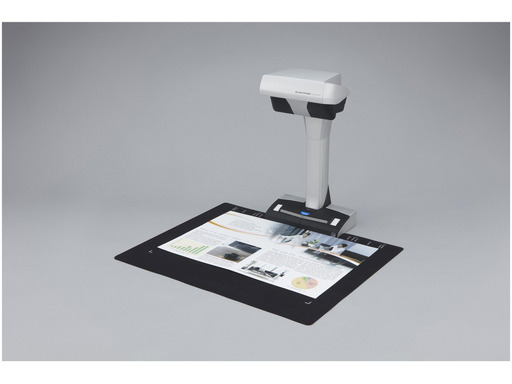
The ScanSnap SV600 allows you to scan newspapers, bound documents, magazines, or books without having to cut or damage the media.Scans everything from business cards to A3 (landscape) documents*Documents larger than A4, such as blueprints, historical documents, and technical drawings, can simply be placed on the black mat and scanned directly, with no extra effort. A fingerprint removal tool keeps the document in place without worrying about fingers appearing in the scanned image.
* The maximum document size for scanning is 400 x 300 mm if the document thickness exceeds 5 mm.
Effortlessly scans bound documentsThe SV600 can easily scan books and magazines. Documents with sticky notes can also be scanned without any issues.
Worry-free scanning of your delicate documents and booksWith “VI technology,” scanning can be performed without contact between the document and the scanner. You don’t have to worry about potential damage that could occur from contact with documents such as drawings, oil paintings, pencil writing, or photos.
The new VI technologyThe new “VI technology” that combines a lens with a large depth of field, a linear CCD image sensor, and a high-directivity LED lamp allows the SV600 scanner to easily reduce inconsistencies in image quality and generate a uniform image, even when scanning from a distance.
Lens offering a large depth of fieldWide autofocus area even when the focus distance changes
Linear CCD image sensorGenerates stable images
Mobile scanning head equipped with a high-directivity LED lampHelps maintain a constant brightness level without interference from the surrounding environment.
Simple operation thanks to numerous featuresThe features of the SV600 have been developed to provide ease of use, speed of execution, and compactness that are characteristic of ScanSnap.
The quick menu for simplified useThe ScanSnap Quick Menu will automatically appear after scanning, allowing you to quickly and easily send your scanned data to an application. You can thus scan your documents directly into a cloud application, for example, for easy sharing of your documents.
Automatic cropping of multiple documents with “Multiple Document Detection”With the press of a button, you can scan multiple documents of different sizes in a single pass of the scanner. Place several business cards, receipts, and photos in the scanning area, and the SV600 will capture all the documents and intelligently and accurately adjust them to their size.
* The scanner can automatically crop up to 10 documents
Fast startup time and scanning speed for better productivityThe startup time of the SV600 is surprisingly fast: it takes barely 3 seconds from startup to ready for scanning and an additional 3 seconds to scan an A3 document.
Compact design with a reduced footprintThe SV600 is incredibly robust, with a solid base, and it is compact enough to allow for efficient use of your workspace without disrupting your daily routines when not in use.
The ScanSnap SV600 model includesOne-touch scanningWith the many features provided, you can continuously scan multiple pages without any issues.
Page-turning gesture detectionAutomatically detects the characteristic gesture of a page being turned.
Scheduled scanning- You can set the wait time before scanning starts once the “Scan” button has been pressed.
- For continuous scanning, you can set the time interval before the next scan starts.
Automatic image correction; enhances the reading experienceBook image correction – Automatically corrects distortion caused by the curvature of an open book or magazine. You can confirm and refine the scanned images from the preview window after scanning or let the software handle it automatically.
Book image correctionEasily corrects document distortion.
User interaction retouchImages of fingers holding the document in place can be easily corrected.
ScanSnap Receipt*
The ScanSnap Receipt software allows you to easily scan your receipts and extract essential information, even exporting the content for tax declarations.
*Available via online update only.
ScanSnap Sync*
With the integration of ScanSnap Sync into the ScanSnap Organizer software and the ScanSnap Connect app, your scanned documents are automatically synchronized across all your devices via Dropbox, Google Drive, or Microsoft OneDrive.
*Available via online update only.
Nuance Power PDF for Windows and Nuance PDF Converter for Mac included
The Nuance software included with the product allows users to read documents directly from cloud-hosted applications and save them directly into them, thereby increasing the possibilities of using and sharing digital documents. If the documents are intended to be managed locally, ScanSnap Organizer is the ideal directory. This application plays a crucial role in the ScanSnap ecosystem, especially when paired with the recent ScanSnap Sync feature, which allows cross-linking between the ScanSnap Connect app and, for example, Dropbox, Nuance Power PDF, or ScanSnap Organizer.
Product Features
- Ricoh ScanSnap SV600.
- Maximum scanning surface: 432 x 300 mm, Optical scanning resolution: 285 x 218 DPI, Black/white scanning color modes: Grayscale, Monochrome.
- Scanner type: Aerial scanner, Product color: Black, White.
- Sensor type: CCD (Charge Coupled Device), Light source: White LED (2x).
- Maximum ISO A series paper size: A3, Supported media scanning types: Business card, Postcard (JPN), ISO, A Series format (A0...A9): A3, A4, A5, A6.
- Socket connector type: C7, Standard interfaces: USB 1.1, USB 2.0
Technical specifications
Général
Type
Scanner sans contact - modèle bureau
Taille maximale de document pris en charge
432 x 300 mm
Scanner
Résolution optique
285 dpi x 283 dpi
Type de capteur de numérisation
CCD
Type de lampe / source lumineuse
DEL blanche
Détails sur la vitesse de numérisation
3 secondes / numérisation - couleur - A3 - 150 ppp ¦ 3 secondes / numérisation - niveaux de gris - A3 - 150 ppp ¦ 3 secondes / numérisation - noir et blanc - A3 - 300 ppp ¦ 3 secondes / numérisation - mode Better Couleur - A3 - 200 ppp ¦ 3 secondes / numérisation - mode Better Niveaux de gris - A3 - 200 ppp ¦ 3 secondes / numérisation - mode Better Monochrome - A3 - 400 ppp ¦ 3 secondes / numérisation - couleur - qualité supérieure - A3 - 300 ppp ¦ 3 secondes / numérisation - mode Best Niveaux de gris - A3 - 600 ppp ¦ 3 secondes / numérisation - mode Excellent Niveaux de gris - A3 - 600 ppp ¦ 3 secondes / numérisation - noir & blanc excellent - A3 - 1200 ppp ¦ 3 secondes / numérisation - mode Excellent Couleur - A3 - 600 ppp ¦ 3 secondes / numérisation - Noir et blanc optimal - A3 - 600 ppp
Fonctions du scanner
Orientation automatique de l'image, détection automatique des couleurs, détection automatique de la taille de page, Deskew, Simplex, Correction d'image
Gestion du support
Taille maximale de document
432 mm x 300 mm
Type de chargeur de document
Manuel
Extension/connectivité
Détails d'interface
USB 2.0 - Type B
Divers
Accessoires inclus
Coussinet d'arrière plan
Câbles inclus
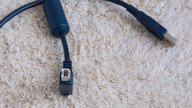
1 x câble USB
Normes environnementales
Alimentation
Périphérique d'alimentation
Adaptateur secteur externe
Tension requise
CA 120/230 V (50/60 Hz)
Consommation en fonctionnement (en veille)
20 Watt
Consommation électrique en veille
0.4 Watt
Consommation en sommeil
2.6 Watt
Logiciels / Configuration requise
Logiciel(s) inclus
Pilotes de périphérique et utilitaires, ScanSnap Manager, CardMinder, Scan to Microsoft SharePoint, ABBYY FineReader for ScanSnap, ScanSnap Organizer, ScanSnap Receipt, Nuance Power PDF, Nuance Power PDF Converter (Mac), ScanSnap Sync
Système d'exploitation requis
Microsoft Windows Vista (32/64 bits) SP2 ou version plus récente, Microsoft Windows XP (32/64 bits) SP3, Apple MacOS X Lion 10.7, Microsoft Windows 7 (32/64 bits) SP1 ou ultérieur, Apple OS X 10.8 Mountain Lion, Windows 8 (32/64 bits), Windows 8.1 (32 /64 bits), Apple OS X 10.9 Mavericks, Apple MacOS X 10.10, Windows 10 (32/64 bits), Apple MacOS X 10.11, Apple macOS 10.12
Configuration requise détaillée
Windows XP/Vista/7/8/8.1/10 - Core i5 - 2.5 GHz - RAM 4 Go - HD 4200 Mo (USB) ¦ MacOS X 10.7 ou ultérieur - Core i5 - 2.5 GHz - RAM 4 Go - HD 2600 Mo (USB)
Dimensions et poids
Garantie du fabricant
Service et maintenance
Garantie limitée - 3 ans
Caractéristiques d’environnement
Température minimale de fonctionnement
5 °C
Température maximale de fonctionnement
35 °C
Taux d'humidité en fonctionnement
20 - 80 % (sans condensation)